Frame WitnessForensicsWindows download

Recover deleted photos and videos on Windows.

Then review every frame with its hash, source and dates.

Frame Witness finds deleted media on cards, drives and disk images, and shows each finding with its source offset, SHA-256 hash and the source of every date, in one local workspace.
Download for Windows See the workspace →

Signed Windows release · 1.1.1 · 82.7 MiB. A free account runs a quick scan; full scans, larger files and the advanced tools need a licence. Licences are available from your account.

Version 1.0 · Windows desktop
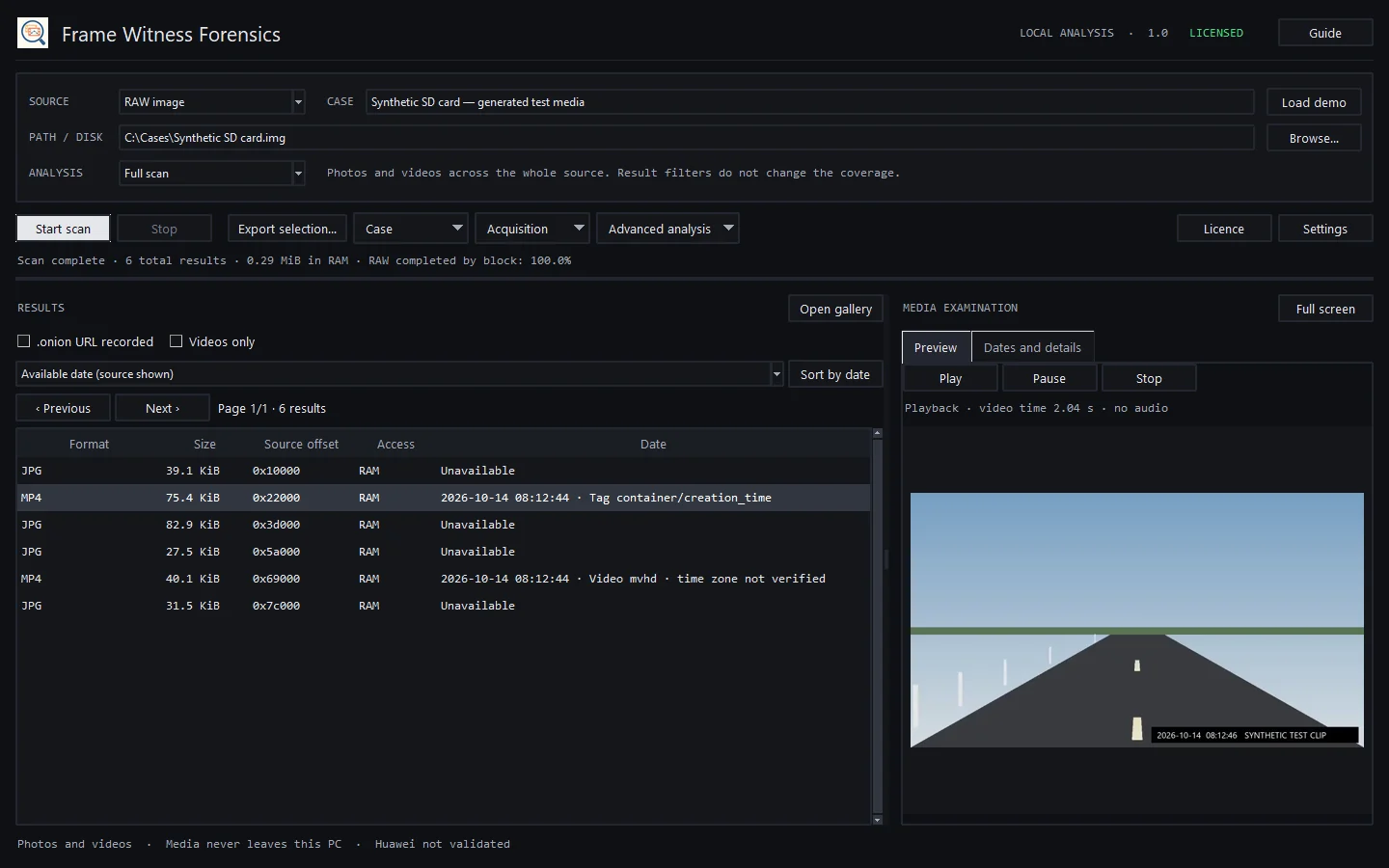
Frame Witness workspace: a table of six recovered photos and videos with size, source offset and date, and a dashcam test clip playing in the media examination panel
The Windows app examining a generated test card: results with sizes, source offsets and dates, and a dashcam test clip playing. Test media generated for this page; no private or recovered data.

Inside the
workspace.

More screenshots of the Windows app examining the same generated test card: the details of a single finding and the gallery.

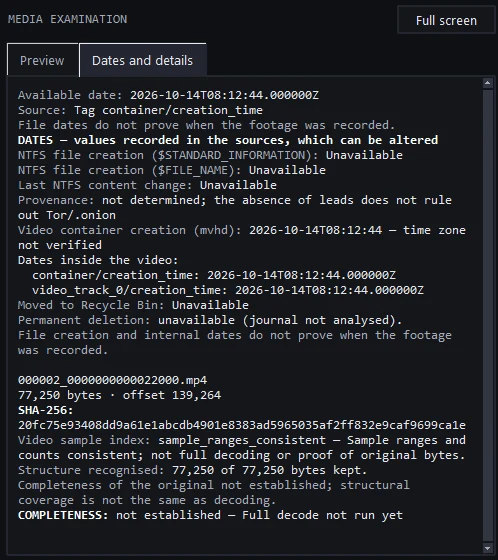
Dates and details panel: each date with its source, the SHA-256 hash, the sample index check and a completeness note
Dates and details: every value keeps its source.
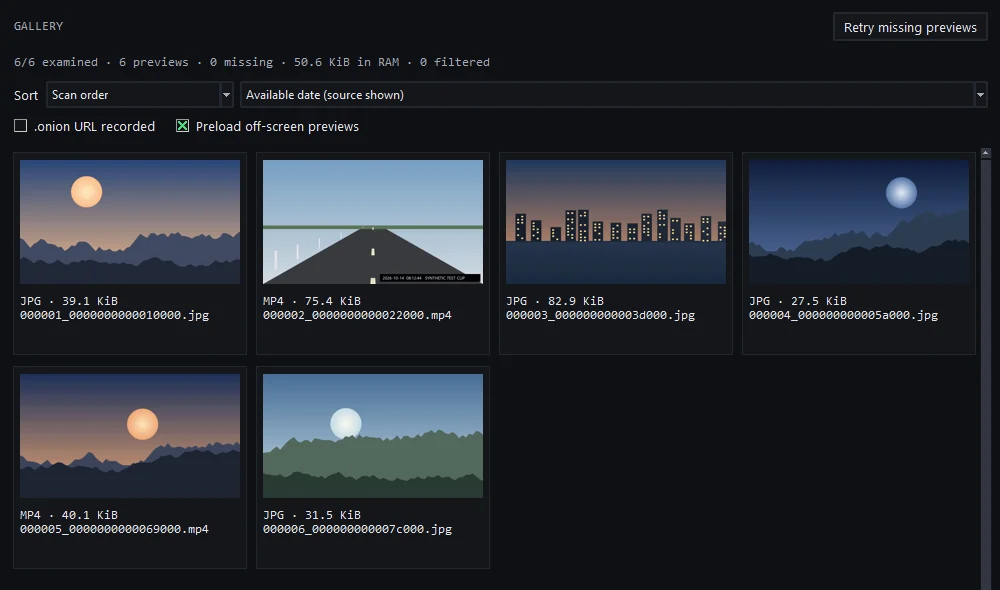
Gallery of six recovered test photos and videos, each with format, size and file name
The gallery, for visual triage before you open a finding.

Recover more context.
Make better decisions.

A list of recovered files is a starting point. Frame Witness brings the media, its source and its available metadata into the same view.

See what deserves attention.

Review findings in a visual gallery, sort by file size or available date, and open the items relevant to your examination. A thumbnail helps you triage a result; playback and structural checks provide additional context. A visible frame alone does not establish that the entire original survived.

Keep the source in view.

Inspect source offsets, SHA-256 hashes and available filesystem records alongside the media. Dates retain their recorded source so you can distinguish file creation, embedded container time and a surviving Recycle Bin record. Missing information stays unknown rather than becoming an invented timeline.

Work on your workstation.

Media analysis runs on your Windows workstation, without uploading recovered content to this website. Scanner and decoder workers use Windows AppContainer isolation to reduce exposure while processing untrusted data. Isolation is a security measure, not a guarantee that malformed media is harmless.

Examination workspaceSYNTHETIC DEMO
synthetic.mp464 × 48 px

Generated test footage. No private or recovered media.

Local analysis Windows AppContainer

A focused tool.
A considered workflow.

From the first read to the exported result, the method matters as much as the media.

  1. 01

    Choose your source.

    Select a supported acquired image or physical disk and define the examination scope. Prefer a preserved image and a write blocker where appropriate: Windows continues changing a live system disk even when the application reads it without writing to the source.

  2. 02

    Search what remains.

    Search available filesystem records and RAW media structures for photo and video candidates. Earlier filesystem remnants may survive a format. Results depend on accessible bytes, fragmentation and supported structures; a complete pass cannot recreate erased content.

  3. 03

    Examine the findings.

    Use the gallery and player to inspect candidates, then compare dates, hashes and structural findings. Distinguish playable content from incomplete fragments. Keep the recorded source of each finding in view before drawing conclusions about recording time or provenance.

  4. 04

    Export with context.

    Export selected recoverable media and retain the associated source metadata. Use a different physical destination to avoid overwriting potential remnants. A saved catalog helps organize the examination; it does not replace preservation of the source.

Look beyond
the filename.

Media recovery is a series of observations. The useful result is content you can inspect, with enough context to explain where it came from and what remains uncertain.

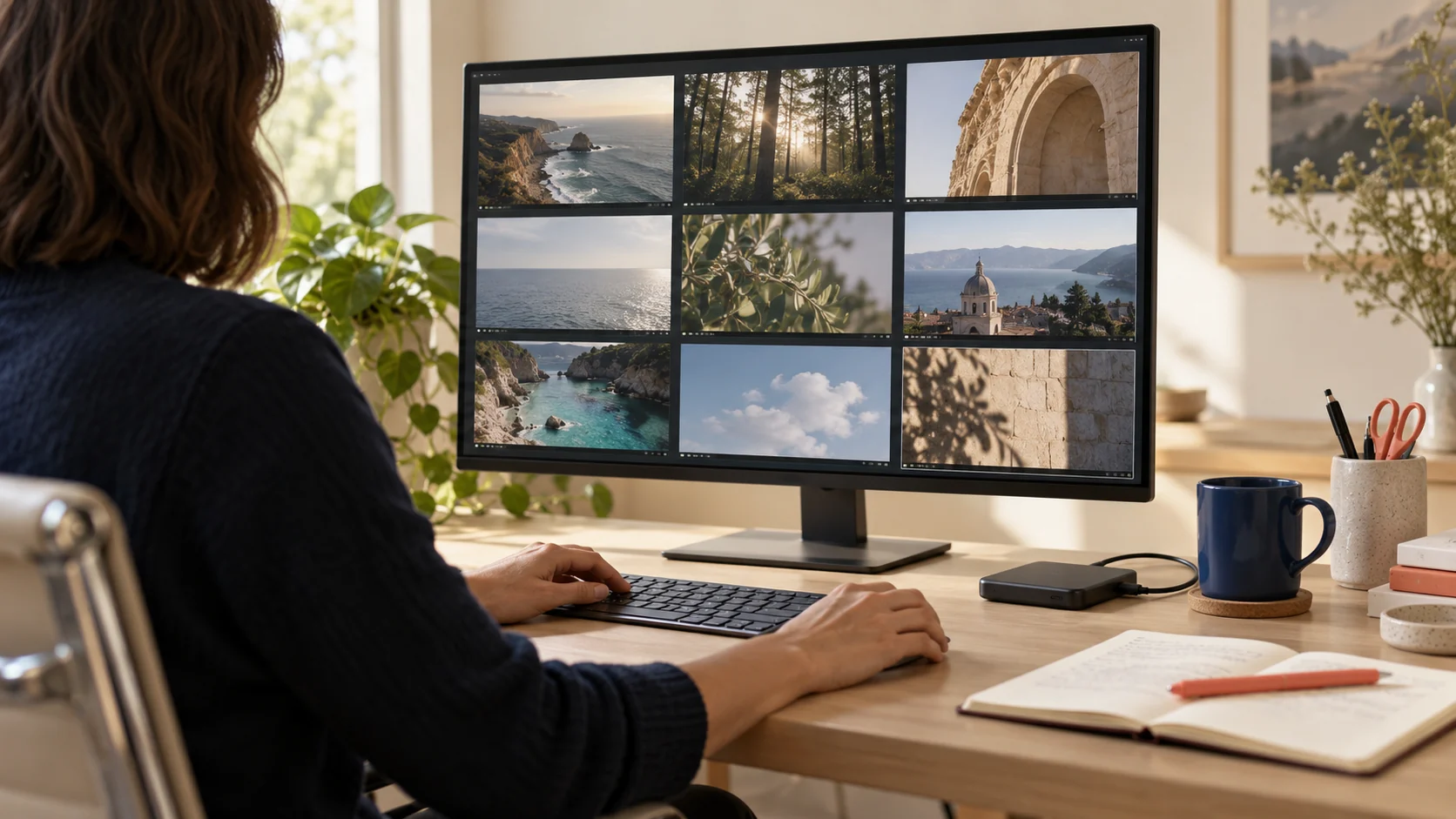
AI-generated examiner reviewing generic landscape frames on a monitor
AI-generated image. The monitor is not the Frame Witness interface.

A focused review starts with the image, then returns to the source. Keep visual observations separate from conclusions about ownership, origin or recording time.

01 / SEARCH DEPTH

Records and surviving bytes.

Filesystem analysis can retain names, paths and allocation information. RAW searching examines recognizable media structures when those records are absent. Use an in-depth search for unclassified remnants; a targeted metadata filter can exclude relevant items whose metadata did not survive.

02 / RECOVERY QUALITY

Complete files and partial findings.

A fragment may contain useful frames even when the original file cannot be reconstructed. Structural recognition, a successful preview and full decoding are different checks. The application presents available findings without treating any one of them as proof of complete recovery.

03 / BROWSER CONTEXT

Tor clues need corroboration.

Available URL metadata, paths and acquired browser or memory residues may offer leads. A video does not carry a dependable “downloaded with Tor” label. An .onion match is a clue to examine, not proof of browser use; no match does not rule it out. Private-session artifacts may never have been written to disk.

04 / PERFORMANCE & COVERAGE

Measure the work, not the file count.

Scan time depends on source size, read speed and the structures being examined. A result counter may stay unchanged while more bytes are read. RAM caching supports review and playback; increasing it does not restore missing data or extend the physical history of an SSD.

Why choose
Frame Witness?

For investigations where the photograph or video is the question.

Frame Witness keeps the scope focused: recoverable photo and video content, visual review, source metadata and verification. That focus gives you a direct path from a scan result to an examination. Visual triage and technical details share the same workflow, so you can inspect an item without losing its source context. Evaluate that workflow against representative cases before choosing it for operational use.

Independent examinersInternal investigation teamsDigital media laboratories

Institutional suitability requires independent review and field validation. These are intended audiences, not existing customers or endorsements.

Choose the capacity.
Keep the same examination tools.

Start independently or equip your team. Higher plans add workstation activations, training and deployment support. They do not unlock a stronger recovery engine.

TRY IT FREE

Two ways to try it before buying. Free account: a quick scan of the first 8 GB that shows the first 100 results with previews, counts the rest and saves recovered files up to 1 MB. Free trial: everything unlocked for 3 days, once per person and per computer, no payment details. Download for Windows, then start either one from your account. A licence keeps everything.

For independent examiners

Professional

One examiner. A focused, local workspace.

€590Standard price · applicable taxes included
Buy Professional
  • One workstation activation
  • Photo & video examination
  • 12 months of updates
  • 12 months of email support
  • One-hour onboarding session

Start with one workstation and guided setup. Choose Lab when more examiners need access.

OPTIONAL ANNUAL RENEWAL

€170 / year · planned tax-inclusive total

Recommended for small teams

Lab

Three workstations. More time for shared training.

€1,590Standard price · applicable taxes included
Buy Lab
  • Everything in Professional
  • Three workstation activations
  • Two hours of shared training
  • Shared workflow onboarding
  • 12 months of updates and email support

Three workstations and twice the training time of Professional. Build a consistent review method across your team.

OPTIONAL ANNUAL RENEWAL

€450 / year · planned tax-inclusive total

For company deployments

Organization

Five workstations. A documented deployment.

€2,690Standard price · applicable taxes included
Buy Organization
  • Everything in Lab
  • Five workstation activations
  • Four hours of shared training
  • Deployment documentation
  • Rollout planning during onboarding
  • 12 months of updates and email support

Two additional workstations, twice the Lab training time and deployment documentation for a larger team.

OPTIONAL ANNUAL RENEWAL

€690 / year · planned tax-inclusive total

Pay with card, Apple Pay, Google Pay or Link.

Prices are confirmed in your account before you pay. Activations are managed through the purchaser account; a shared team-member portal is not included. Licence and sale terms are in the Terms of sale and licence. Optional renewals are not discounted.

PLANNED ASSISTED PILOT

Evaluate a defined workflow first.

A proposed 30-day evaluation for one user, an agreed synthetic test corpus and a one-hour session. The €199 pilot fee would be credited toward a licence purchased within 90 days, subject to final terms. Pilot enrollment is not open yet.

€199EUR · planned tax-inclusive totalCreate an account

Payment. One payment through Stripe, which shows the final total before you pay. No automatic renewal. Licences are delivered immediately and are not refundable; see the terms.

Scope. Support and training concern the product. Case consultancy, external audits, hardware, mobile acquisition and physical repair are separate. More than five workstation activations requires a separate agreement.

Licence. A perpetual licence for the purchased version with 12 months of updates: Professional covers 1 workstation, Lab 3 and Organization 5. A plan is not certification or a recovery guarantee.

All plans, trial and licence terms on one page.

Before you
begin.

Straight answers about what recovery can and cannot establish.

Can it recover deleted media or files from an older format?

It searches surviving filesystem records, including NTFS records and FAT32 or exFAT folders left by an earlier format, and raw media structures. It rebuilds fragmented MP4, MOV, 3GP, AVI, MKV and WebM videos from their own index when that index and the pieces survive, and also recognises MPEG-TS, M2TS, MPEG-PS, WMV, ASF and MXF. When newer recordings overwrote the beginning of a video but its index survived, the frames still on the device are rebuilt into a playable video, labelled as a partial reconstruction. This has been checked on synthetic test images, virtual disks and a quick-formatted USB stick; results on real cameras vary. A full format in Windows, an overwrite format and SSD TRIM leave nothing to recover, and an encrypted volume cannot be read without its key.

What happens if a card or drive stops responding?

Frame Witness reads physical disks through a separate process with a time limit on every read. It is designed so that a device that stops answering does not freeze the app or Windows. So far this has been checked with a simulated failing device and one USB stick; failing card readers, hard drives and SSDs have not been tested yet. When a read times out, that process is stopped and a window guides you: unplug the device, wait ten seconds and plug it back in. Once Frame Witness recognises the same device, the scan continues where it stopped and the results found so far are kept. Unreadable sectors are listed in the report. If a device keeps failing, stop and consult a data recovery laboratory rather than trying again.

Can it identify videos downloaded through Tor?

Surviving download records, paths or URL metadata may provide clues. A recovered video alone has no reliable browser label. Tor provenance is not guaranteed, and an .onion reference does not establish which browser was used.

Does it scan the disk or just RAM?

It reads the selected disk or image. RAM is used as a cache for results and playback; changing the cache size does not change scan coverage.

Do dates prove when the video was recorded or deleted?

No. Dates are presented with their source when available. Filesystem creation dates can reflect copying, and embedded dates can be changed. Missing dates remain unknown.

Is it ready for commercial use?

Version 1.1.1 is available as a signed release. Local synthetic recovery, playback, isolation and licence checks passed. The last clean-install test used the 1.0.10 installer on a Windows 11 virtual machine: installed for all users with administrator approval, then used by a standard user. The installer has changed since then, and version 1.1.1 has not yet been tested on a clean virtual machine, on Windows 10 or on physically failing hardware. Independent review and representative field trials are still needed before institutional use.

Which languages does the app use?

It starts in English. German, Spanish, French, Italian and European Portuguese can be chosen in Settings, and the choice is kept for your Windows user. The website, account pages and licence emails are in English.

Are phones supported in the initial release?

Phone validation is incomplete. Recovery from locked phones is outside the initial commercial scope.
WINDOWS RELEASE

A signed Windows release.

Download version 1.1.1 for Windows. It installs for all users in Program Files, so installing asks for administrator approval, and an update replaces the previous version instead of keeping it beside the new one. A free account includes a quick scan of the first 8 GB (up to 100 results shown, the rest counted), previews and saving recovered files up to 1 MB each. The free trial unlocks everything for 3 days, once per person and per computer, with no payment details. After that, larger files and the advanced tools need a licence, which free registration does not include. Licences are available from your account.

Create your account

Download for Windows Release notes & checksum

SHA-256
0d6410aff0413d02517a179d28c2039b3757c861559659f5845930b8aa055db9

  1. Publisher signingThe final installer is Authenticode-signed by Aurelio Avila and timestamped by Certum. The GitHub download was checked against its SHA-256 digest and publisher signature.
  2. Redistribution reviewDependency notices and corresponding source references are included in the application package. The application remains proprietary.
  3. Release and commercial checksLocal synthetic recovery, preview, playback and licence controls passed. The last clean-install test used version 1.0.10 on a Windows 11 virtual machine: installed for all users with administrator approval, started by a standard user, then uninstalled. The installer has changed since then, and version 1.1.1 has not yet had this test. Terms of sale and licence are published.

Version 1.1.1 · publisher Aurelio Avila. Verify the signature and checksum before installation. Signing does not guarantee an absence of vulnerabilities or SmartScreen warnings.

YOUR FRAME WITNESS ACCOUNT

Set up your account.
Keep the next step clear.

Create a free account with your email and password. Sign in to manage your profile, orders and support. No purchase required.

  1. 01
    Create a free account

    No package, invitation or payment is required. Compare the plans whenever you are ready.

  2. 02
    Verify your email

    Activate your account using the link sent to your email, then sign in.

  3. 03
    Activate the desktop app

    A free account activates the quick scan. A paid order adds full scans and the advanced tools; its signed licence file is waiting in your account.

Keep media and case evidence on your workstation. Account access is separate from local forensic analysis.

Share a public workflow requirement →

Signing in to GitHub is required to reply. Use synthetic examples, not evidence or private identifiers.

Examination notes.

Practical questions about surviving media, source context and what a finding can establish.

From the same developer: PC Tweaker (Windows tweaks you can undo) · CertSprint (IT certification practice tests) · Redaxa (keeps secrets out of AI prompts) · Glarion (website security reports for agencies) · Redexa Social (YouTube analytics for Windows)